Image courtesy of Apple.
If your local SEO strategy begins and ends with Google Business Profile optimisation, you may be overlooking a significant part of the UK search journey.
Apple Business Connect, now incorporated into the wider Apple Business platform, allows you to control how your business appears across Apple Maps and other Apple services. That includes the information customers see when they search for you, ask Siri for recommendations or look for a nearby business from an iPhone.
This matters because Apple has an unusually strong presence in the UK. Usage-based market data from StatCounter regularly places iOS at around half of UK mobile usage, although the exact figure varies by measurement and month.
You do not need to replace your Google strategy. You need to ensure Apple is not an unclaimed, outdated gap in it.
What is Apple Business Connect?
Apple Business Connect was Apple’s dedicated platform for businesses to manage their presence in Apple Maps. In 2026, Apple moved these brand and location tools into Apple Business, an all-in-one platform for managing business operations and customer-facing information.
The local search features remain highly relevant. You can use Apple Business to manage your:
- Business name, address and phone number
- Opening hours and special holiday hours
- Categories and business description
- Website and customer-facing links
- Photos and logo
- Location entrance and map position
- Showcases for offers, events and new products
- Custom actions such as Book, Order or Reserve
Your information can then appear across Apple Maps, Siri, Spotlight, Safari, Wallet, Calendar, Messages and CarPlay, depending on the customer’s search or action.
Why Apple Maps matters for UK businesses
Reach customers using iPhone, Siri and Apple apps
When a customer says, “Hey Siri, find a plumber near me,” or searches Apple Maps for a restaurant, salon or professional service, your Apple listing becomes part of that discovery journey.
A complete and accurate Place Card can help the customer:
- Find your location.
- Check whether you are open.
- View photographs and key details.
- Call or visit your website.
- Book, order or reserve directly through an available action.
That is a shorter path from discovery to conversion than a listing that only displays a name and an address.
Benefit from a less crowded channel
Most businesses have heard of Google Business Profile. Far fewer actively manage Apple Business.
That creates an opportunity. Your competitors may have invested heavily in Google Maps while leaving their Apple listing with an old telephone number, incomplete opening hours or poor-quality photographs.
Local search visibility is not simply about appearing in one place. It is about being present wherever your customers search. For many UK audiences, Apple Maps is a default option rather than an occasional alternative.
Support trust and consistency
Customers notice contradictions. If Google says you close at 6pm but Apple Maps says 5pm, a potential customer may choose a competitor rather than risk a wasted journey.
Consistent information also makes your business appear more established and reliable across the wider local search ecosystem. It does not mean that updating Apple Business will directly improve your Google ranking. It does mean that you should treat every important business directory as part of the same customer experience.
Apple Business versus Google Business Profile
Use both platforms, but understand their differences.
| Area | Apple Business | Google Business Profile |
|---|---|---|
| Main discovery environment | Apple Maps and Apple services | Google Search and Google Maps |
| Management platform | Apple Business | Google Business Profile |
| Assistant integration | Siri | Google Assistant and Google Search |
| Promotional content | Showcases | Posts, offers and updates |
| Customer actions | Custom actions such as Book or Order | Booking, messaging, calls and website visits |
| Insights | Apple Maps searches, views and action taps | Searches, views, calls, directions and website activity |
| Review ecosystem | Varies by listing and connected services | Google Reviews |
Your Google Business Profile optimisation work remains essential. However, Google does not automatically manage your Apple listing for you, and Apple does not automatically keep your Google profile accurate.
Create a single source of truth for your business name, address, phone number, opening hours, categories, booking links and photography. Then apply it carefully to both platforms.
Where does Apple get business information?
An Apple Maps listing may exist before you claim it. Apple can display basic information gathered from existing business data and third-party sources.
Today, your listing information can come from:
- Your claimed Apple Business profile
- Approved third-party listing management partners
- Existing business data used to create an unclaimed listing
- Connected services that provide booking, ordering or other actions
Apple’s official guidance explains that businesses can claim locations, customise Place Cards and manage photos, hours and customer actions. Apple also provides tools and APIs for approved partners to manage location data at scale.
That means you should not assume an unclaimed listing is accurate simply because it exists. Search for your business in Apple Maps, review every detail and claim the correct location through Apple Business.
What should you complete?
1. Business details
Enter your official business name, address, telephone number, website and primary category. Avoid keyword stuffing or adding unnecessary locations to your business name.
If you operate from a service area rather than a customer-facing premises, check Apple’s eligibility and presentation options carefully. Apple supports businesses without a traditional shopfront, but the information must still accurately describe how customers interact with you.
2. Opening hours
Add standard hours and special hours for bank holidays, Christmas, Easter and planned closures.
Seasonal accuracy is crucial for local businesses. An incorrect “open” status can create a poor customer experience, while an incorrect “closed” status can cost you a visit or booking.
3. Photos and branding
Use clear, recent photographs that show the premises, interior, team, products or work. Prioritise images that help someone recognise your business when they arrive.
Do not upload stretched logos, irrelevant stock images or photographs with visible competitor branding. Refresh your most important images as your business changes.
4. Showcases
Use Showcases to highlight a promotion, seasonal service, event, new product or important announcement.
A good Showcase should be:
- Specific rather than generic
- Time-sensitive where appropriate
- Relevant to the customer’s likely intent
- Supported by a clear call to action
For example, a restaurant could promote a Christmas menu with a reservation link. A beauty business could highlight a seasonal treatment with a booking action. An independent retailer could showcase a new collection and link to its online shop.
5. Actions
Add the most useful action available for your customer journey, such as Book, Order, Reserve, Schedule an Appointment or Shop.
Test every link on a mobile device. Do not send customers to a cluttered homepage if a direct booking or ordering page is available.
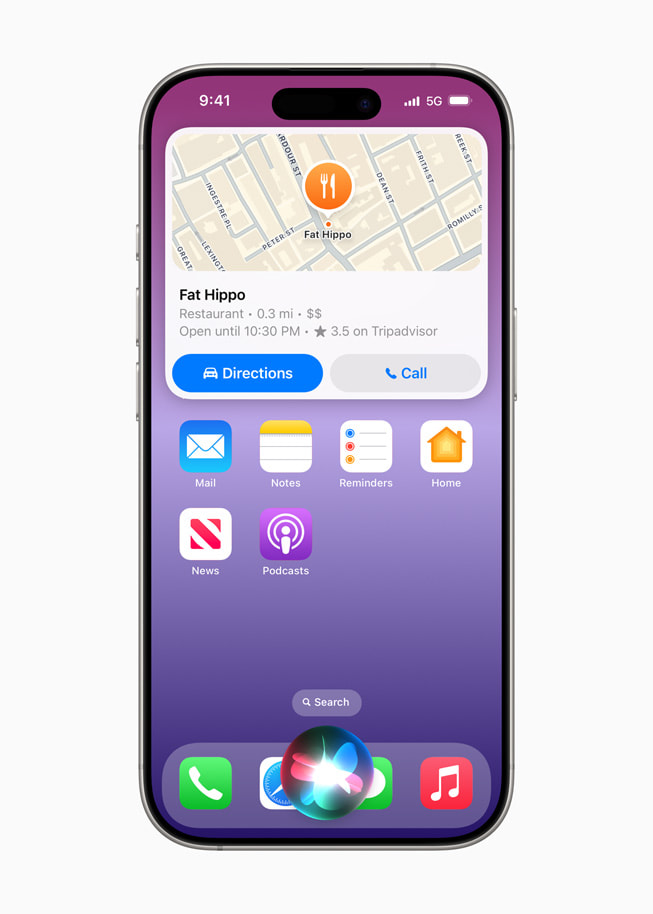
Apple Place Cards can include business information and action links. See Apple’s feature announcement.
Your practical 20-minute Apple Business checklist
Allow extra time for verification, but use this checklist to complete the core setup or identify gaps quickly.
-
Minutes 0–3: Find your listing
Search for your business in Apple Maps. Check that you have selected the correct location and have not created a duplicate. -
Minutes 3–6: Claim or verify the business
Sign in through Apple Business and follow the verification process. Apple may require evidence that you represent the business. -
Minutes 6–10: Correct your core details
Check the name, address, map pin, telephone number, website, category and service description. -
Minutes 10–13: Update opening hours
Add standard hours and review upcoming special hours. Make sure they match your website and Google Business Profile. -
Minutes 13–16: Add useful photographs
Upload recent, high-quality images that show customers what to expect. Prioritise the exterior, interior, team, products or completed work. -
Minutes 16–18: Add an action
Link to the most valuable next step, such as booking, ordering, reserving or shopping. -
Minutes 18–20: Publish and cross-check
Review the listing on a mobile device. Compare it with your Google profile and website, then add a monthly reminder to check for changes.

Apple Business includes insights into how customers discover and interact with locations on Maps.
Maintain Apple Business as part of local SEO
Do not treat this as a one-time task. Build Apple Business into your local SEO routine.
Review the listing:
- Monthly for hours, links and customer actions
- Before every seasonal period for special opening times
- When you launch a new service or product
- After moving premises or changing telephone numbers
- When your website, booking system or branding changes
Also audit the information across your website, Google Business Profile, social profiles and major directories. Your digital marketing audit guide can help you create a broader review process.
Make Apple part of your local search strategy
Apple Business is not a replacement for Google Business Profile optimisation. It is the missing companion for businesses that want a more complete local search presence.
Claim the listing, correct the essentials, add useful imagery and make it easy for customers to take action. Then maintain it alongside Google rather than waiting for an incorrect detail to become a customer complaint.
Not sure whether your Apple, Google, website and social presence are working together? Use The Digital Academy’s free marketing resources to identify the gaps. Our free digital marketing assessment provides a practical view of your current performance and the next improvements worth prioritising.